On November 10, 2026, OpenAI opened something called Business Hub, and for the first time a business owner can claim the profile ChatGPT shows about their company. I spent the last two weeks reading every page OpenAI published about it, along with the complaints owners are posting on OpenAI’s own community forum.
This guide covers what most early articles skip, which is how the process works for a local business like a house cleaning company, a plumber, an auto glass shop or a law office. Most guides written so far were made with online stores in mind, and that matters, since the rules for a local business are different and a lot stricter. If you run a business where customers call you, visit you or have you come to their home, the steps below will save you time and probably a few headaches.
The short answer
To claim your business in ChatGPT, sign in, open Business Hub from the sidebar and search for your business name. Select your listing and verify it with your business phone, your business email, a DNS record on your website or your Shopify store.
After OpenAI approves the claim, you complete an identity check with a company called Persona, and only then can you edit your information and see how often ChatGPT shows your business. It is free and you don’t need to buy ads. The catch is that local businesses can only claim a listing ChatGPT already has in the United States, so if yours doesn’t show up in the search, there is nothing to claim yet.
What claiming your business in ChatGPT does, and what it doesn’t
Think of Business Hub as ChatGPT’s version of your Google Business Profile. Once you are verified, you can update your website, description, category, logo and cover photo. You also get a small dashboard that shows how many times ChatGPT mentioned you in the last 28 days and how many people clicked through to your website.
I want you to read this next part twice, since almost nobody is saying it out loud. OpenAI’s own help page says claiming lets you manage your information without guaranteeing more visibility, and in the section about ownership disputes it states that claiming a profile doesn’t change its visibility in ChatGPT. In plain words, the blue check makes your listing accurate, and it won’t move you ahead of the competitor ChatGPT names today.
That doesn’t make it useless. If ChatGPT shows your old phone number, a location you closed or a description that sounds like a different company, every customer it sends you starts with bad information. Claiming the profile is the only way to correct that at the source.
Is ChatGPT Recommending Your Competitors Instead of You?
More people now ask ChatGPT, Gemini, and Google’s AI answers who they should call, and those tools only name a handful of businesses. I help local businesses and law firms become one of the names AI knows and recommends. See how it works and what it takes for your business.
What you need before you start
Gather these four things before you open Business Hub, since the process stops cold if one of them is missing and some of them depend on other people, like your web person or your accountant:
- A ChatGPT account that belongs to the business, signed in with an email you control. Avoid using an employee’s personal account or your agency’s account, since whoever claims the profile becomes its admin.
- Access to the phone number or email address that appears on your listing, or access to your website’s DNS settings (whoever manages your domain can help with this part).
- A government issued ID for the identity check.
- Your legal business name, registered address and registration or tax number, written exactly as they appear on your official documents.
The legal name trips up a lot of owners. If customers know you as Sunset Plumbing but the state has you registered as R&M Services LLC, the legal name field gets R&M Services LLC, and Sunset Plumbing goes in the trade name or “doing business as” field if one appears. OpenAI asks that your name, address and tax number match your records, and when they don’t, the check can fail and a second try isn’t always offered.
How to claim your business in ChatGPT, step by step
Step 1. Open Business Hub and search for your business
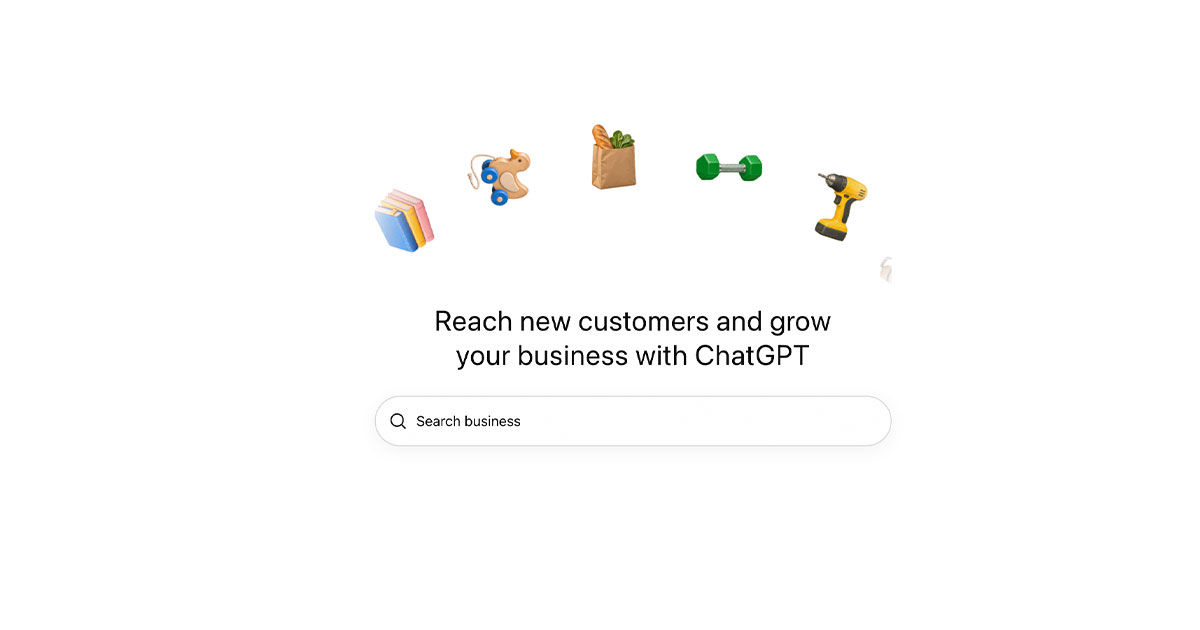
Sign in to ChatGPT on a computer and click Business Hub in the left sidebar, or type chatgpt.com/business-hub in your browser. Search with the exact name your customers see, and if nothing comes up, try a shorter version of the name or add your city before you decide you are not listed.
Step 2. Pick the right listing
Look at the address and phone number on each result before you click anything, since similar names show up side by side and the results tend to favor businesses near where you are searching. Select the one that matches and confirm the ChatGPT account you will use to manage it.
If you see a Contact support button instead of the normal options, the listing is locked and that button is the only way in. If someone else already claimed your business, open the profile, click the three dots menu and choose Dispute ownership, which sends you through the identity check to prove you have the right to it.
Step 3. Verify that the business is yours
ChatGPT shows the verification methods available for your listing, and they change from one listing to another, but these are the options most owners will see:
- Business phone: a text message or an automated call with a code, sent to the number on the listing.
- Business email: a code sent to the email address tied to the business.
- Website domain: a TXT record that you or your web person add to your DNS settings.
- Shopify store: only if you sell through Shopify.
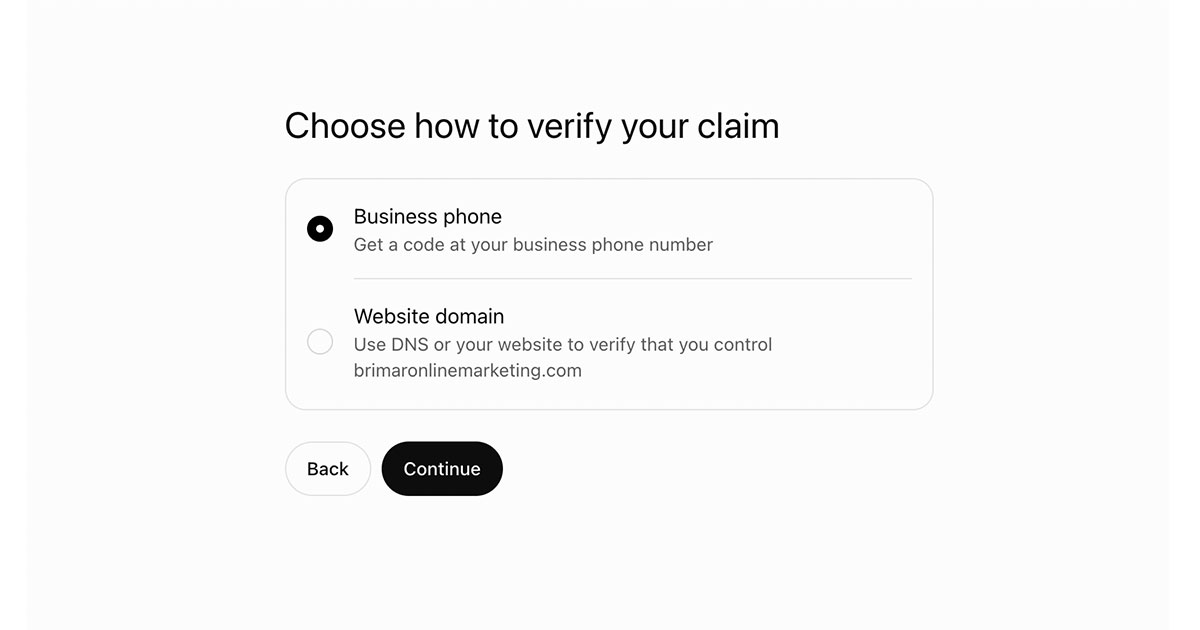
If the phone on the listing is an old number you no longer have, use the website domain option, which lets you prove ownership without changing the public phone number. One warning from the forum: a few owners said the DNS check expired after about 30 minutes, before their new record had spread across the internet. If your domain is with GoDaddy, Namecheap or a similar company, add the record as soon as ChatGPT gives it to you and keep that window open, or have your web person ready before you start.
Step 4. Wait for OpenAI’s approval
OpenAI reviews each claim and emails you the decision or requests more information. There is no set waiting time, so resist the urge to start a second claim while the first one is still pending, which only makes the situation messier.
Step 5. Complete the Persona identity check
After the claim is approved, open the Business tab, select your profile and look for Complete verification with Persona. Persona may ask for your ID, your business registration information and proof that you are allowed to represent the business. One owner on the forum reported being asked for an SSN or EIN plus a physical address that couldn’t be a P.O. box. Until Persona approves you, you can’t publish changes, you can’t see insights and the blue check won’t appear on your profile.
Step 6. Update your information and check your insights
Once both approvals arrive, fill in everything you can: website, description, category, logo and cover photo. Write the description the way a happy customer would describe you to a friend, including your main service and the cities you cover, since ChatGPT may repeat this text to people. OpenAI reviews changes before they go live and says updates can take time to appear, so don’t worry if an answer still shows old details a few days later.
What to do if your business isn’t in ChatGPT
This is where most local owners get stuck. Online stores can create a new profile when they can’t find themselves, but OpenAI says local stores and restaurants can only claim an existing listing in the United States. That means a cleaning company or a law office that doesn’t appear in the search has no button to press today.
Please don’t try to get around it by creating a profile as an online business when you are a local one. OpenAI’s policy forbids fake or duplicate profiles and any misrepresentation of the business, and OpenAI can remove a profile or limit what you are allowed to manage.
What you can do is work on the places ChatGPT already reads when it answers local questions. OpenAI doesn’t publish a complete list, but the public evidence points to a few of them:
- Yelp says its reviews, ratings, photos and business details show up directly inside ChatGPT, so claim your Yelp page and make sure every detail on it is correct.
- OpenAI says ChatGPT search works with outside search providers and points to Microsoft’s privacy policy among them, so a complete and accurate Bing Places listing is a smart and free move.
- Your own website. ChatGPT can only use your pages if OpenAI’s crawler, called OAI-SearchBot, is allowed to read them, so ask your web person to check that your robots.txt file isn’t blocking it.
- Directories and official registers for your trade. In one study by Peekl, 27% of ChatGPT’s citations for local questions went to official bodies such as licensing boards and city websites, so your state license page and your trade association listing carry real weight.
- The same name, address and phone everywhere. When your details match across your website, Google, Yelp and every directory, AI tools can connect all of them to one business with more confidence.
Your Google Business Profile still matters a lot, especially for Gemini and Google’s AI Overviews, which pull from Google Maps, but Google is not one of the sources OpenAI names for ChatGPT. That explains why some businesses with a strong Google profile and dozens of reviews barely appear in ChatGPT answers, while a competitor with a busy Yelp page gets named over and over.
If you run your business from home
Many service businesses, from house cleaners to mobile mechanics, work from a home address that never appears in public. OpenAI’s help page doesn’t say whether the address you give Persona can show up on your ChatGPT profile, and when an owner asked that exact question on OpenAI’s forum, nobody from OpenAI had answered it by the time I wrote this guide.
Until OpenAI clears that up, read every screen before you submit anything. Keep in mind that OpenAI says its support team can’t delete, unpublish or hide a published profile and that only drafts can be deleted, so if something feels wrong, stop there and contact OpenAI support before you send your information.
Mistakes that will cost you later
The first mistake is letting your marketing agency claim the profile with its own account. OpenAI lets the admin who claimed the business add teammates and give an agency access, so the right move is to claim it yourself and invite the agency. That is the same rule I follow with my clients, where every profile stays in the owner’s name from day one.
The second is choosing the wrong listing. If your business has two locations or a name close to another company’s, you can end up verifying a profile that isn’t yours, and fixing that later means a trip through OpenAI support.
The third is expecting the phone to ring more the next morning. Claiming fixes your information, while the recommendation itself depends on what ChatGPT finds about you on the rest of the web, and I cover that part below.
How to read your Business Hub insights
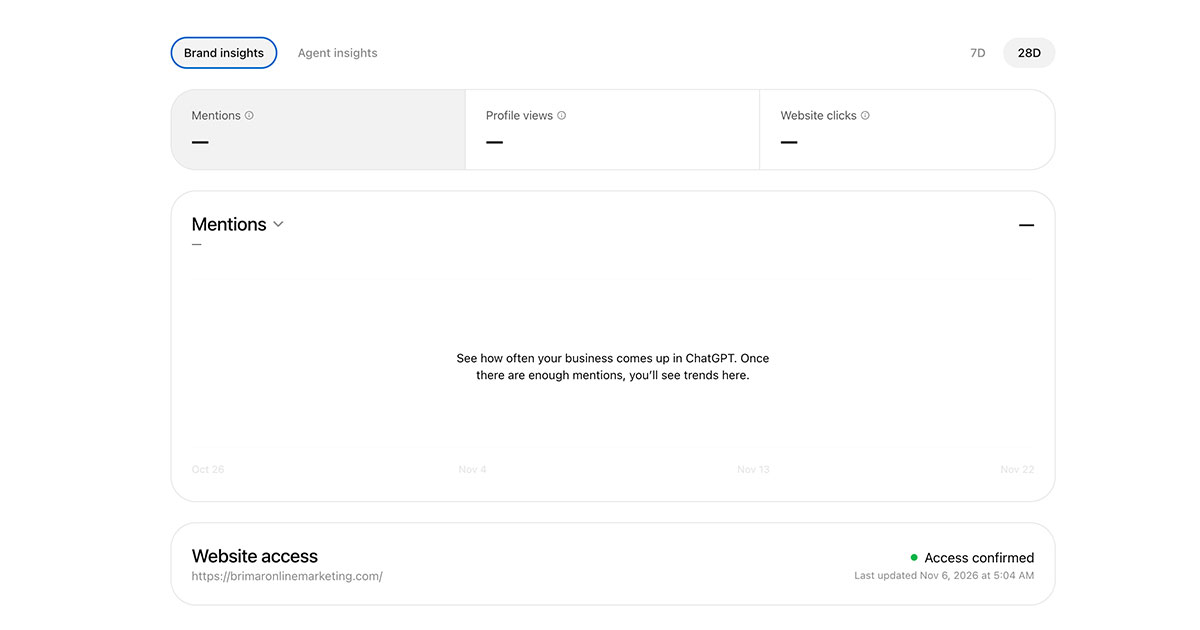
The Insights tab shows activity from the last 28 days. For a local business, a mention counts every time ChatGPT shows a result for your location, even if the customer never opens your listing or visits your website. Think of mentions as how often you were part of the conversation, and website clicks as how often someone cared enough to look closer.
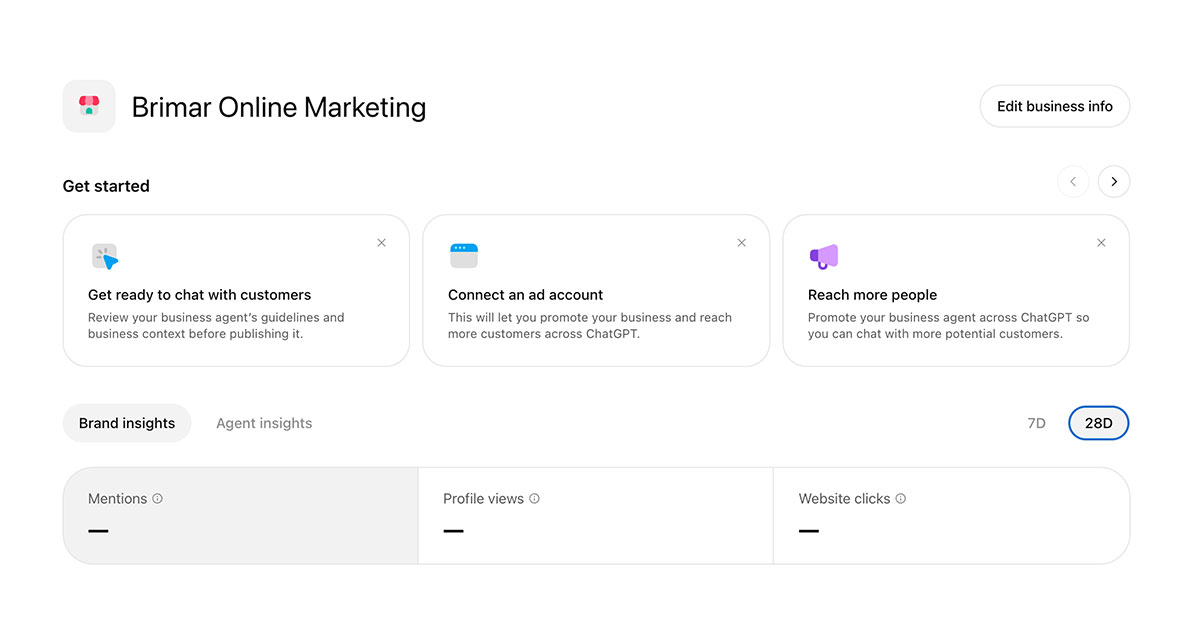
Don’t read a blank number as zero, especially in the first weeks. I set up Brimar Online Marketing in Business Hub a day or two after OpenAI opened it, and the dashboard shows three numbers (mentions, profile views and website clicks) that you can switch between the last 7 and 28 days. Close to two weeks later, each one still shows a dash, and the discovery topics chart sits empty with a note saying topics will appear once there are enough mentions. OpenAI explains that an empty metric can mean the activity hasn’t reached the reporting threshold or the data is still being collected, so a new profile starting at a dash is normal and gives you no reason to panic.
Keep in mind that the dashboard only counts from the day you claim the profile, and earlier this year a law firm on the East Coast and a new web design client both found Brimar by asking ChatGPT, months before Business Hub existed. You also won’t see the questions people typed, since OpenAI only shows general discovery topics, so keep asking every new customer how they found you and treat these numbers as one more signal.
Claiming is step one, getting recommended is the goal
This is the part I worry about for my clients. ChatGPT gives short answers, and in Peekl’s tests it cited about 2.4 web pages and named about 2.2 businesses per answer, which means there is no page two where a customer might still find you. When Peekl asked ChatGPT the same local question 10 times, no single business showed up in all 10 answers, so a screenshot your cousin sends you proves very little in either direction.
I see the upside in real numbers too. A house cleaning company in San Francisco that I work with logged 34 new inquiries between mid September and late November 2026, and 10 of them came through AI tools like ChatGPT, Grok and personal AI assistants. Three of those people became recurring clients, and most of that happened before Business Hub even existed, as a result of steady work on the website, the listings and the reviews that AI tools read.
So claim your profile this week, while it is new and before someone else tries to grab it, and then put your energy into the sources ChatGPT trusts. If you want the longer version of how that works, I wrote a guide on how to get cited by AI assistants like ChatGPT and Perplexity.
Frequently asked questions
Is it free to claim my business in ChatGPT?
Yes, claiming your business in Business Hub costs nothing. OpenAI says you don’t need an ads account or a ChatGPT Enterprise agreement to claim an eligible business.
Will claiming my business make ChatGPT recommend me more often?
OpenAI says claiming doesn’t guarantee more visibility and that advertising doesn’t influence ChatGPT’s independent answers. Claiming controls the information on your profile, while recommendations depend on what ChatGPT finds about your business across the web.
Can I add my local business if ChatGPT doesn’t list it?
Not right now, since local stores and restaurants can only claim an existing listing in the United States. Meanwhile, strengthen your Yelp page, your Bing listing, your website and your directory profiles, and check Business Hub again every few weeks.
Can my agency manage my ChatGPT business profile?
Yes, the admin who claimed the business can add teammates and grant an agency access. Each person signs in with their own ChatGPT account, so you never need to share your password.
Can I set up a Business Agent for my local business?
Not yet, since Business Agents, the chat assistant that answers customer questions inside ChatGPT, are only open to eligible online stores and online service businesses in the United States. OpenAI says access will expand to more types of businesses over time.
Find out what ChatGPT says about your business today
Claiming your profile is something you can start this afternoon. Knowing whether ChatGPT recommends you, names a competitor or has never heard of you is a different question, and that is exactly what my free AI visibility audit answers. I run the searches your customers are most likely to type on ChatGPT, Google AI Overviews and Gemini, and I show you in plain English who gets recommended and what is holding your business back.
Find Out What AI Is Saying About Your Business
I’ll check how ChatGPT, Google AI Overviews, and Gemini describe your business, whether they recommend you, and which competitors show up in your place. The audit is free, and you walk away with a clear list of what to fix first.